
A 5 V scalar produces approximately 50%. At 10 V, the scene is recalled at its full stored levels.
TWO 0-10 V INPUTS · SCENE SELECT + LEVEL SCALE
Scene10cas
Turn two analog channels into a complete Casambi scene station.
Channel 1 divides its 0-10 V range into up to ten scene windows. Channel 2 scales the selected scene from off to its stored maximum—preserving the color, balance and intent already programmed into that scene.
 MADE IN USADesigned, built and supported in Mesa, Arizona
0-10 V SELECTOR → Scene10cas → CASAMBI SCENE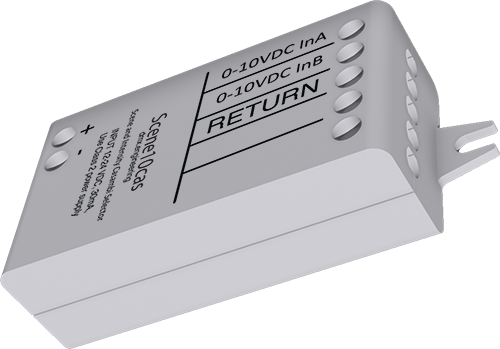
2 × 0-10 VSCENE + SCALE
The first voltage chooses a prebuilt scene. The second can only scale that scene downward from its stored levels.
2-10 scenesequal selector windows
2 fixed rolesscene selector + downward scalar
17 parametersscene count, analog tuning and mappings
FIXED TWO-CHANNEL BEHAVIOR
Channel 1 chooses.
Channel 2 scales.
Scene10cas is a scene Gateway, not two independently assignable Elements. Build and verify the Casambi scenes first, then bind each voltage window to the required scene.
Analog controllerSelector voltage + scalar voltage
→
Scene10casWindow lookup + scene mapping + scalar
→
Casambi sceneStored color and balance, scaled downward
INTERACTIVE VOLTAGE-WINDOW LAB
Pick the scene count. Watch the windows form.
The trimmed selector span is divided into equal windows. Commission at the center of each window—not on the boundary.
Build the analog station
DOWNWARD ONLY
At 10 V, Channel 2 preserves the scene's stored levels. It cannot raise a scene channel above the value saved in Casambi.
At 10 V, Channel 2 preserves the scene's stored levels. It cannot raise a scene channel above the value saved in Casambi.
Scene 3 selected
WINDOW WIDTH2.50 V
RESULTING LEVEL35%
WHY SCENE SCALING MATTERS
Change brightness without flattening the design.
A scene can contain different luminaire levels, colors and group relationships. The scalar reduces those stored levels proportionally instead of replacing them with one absolute value.
A 5 V scalar produces approximately 25%. Even 10 V preserves the designed 50% maximum.
Use window-center setpoints. Trim, wiring drop and noise make exact boundaries poor commissioning targets.
SEVENTEEN VENDOR PARAMETERS
The analog behavior and every scene slot are explicit.
Set the scene count, tune both input channels independently, then bind Scene Slots 1-10 to pre-made Casambi scenes.
Choose 2-10 equal voltage windows across Channel 1. The inspected stored default is 2.
Sets selector endpoints and suppresses noisy scene-boundary chatter.
Sets the scalar endpoints and prevents repeated level commands from analog noise.
Bind each used selector window to one pre-made Casambi scene. Leave unused higher slots unassigned.
A qualifying change on either input sends the current mapped scene and scalar immediately.
For four scenes, test near 1.25, 3.75, 6.25 and 8.75 V—not at 2.5 V boundaries.
TWO INPUTS WITH FIXED JOBS
Label the conductors by function.
Use an indoor Class 2 installation, maintain a common analog return and keep the radio clear of metalwork.
POWER + / POWER -
12-24 VDC Class 2 supply, 30 mA. Correct polarity; no constant-current LED output.
IN A / RETURN
Channel 1 scene-selector voltage and common. Configure 2-10 voltage windows.
IN B / RETURN
Channel 2 downward scene-level scalar. 10 V preserves the stored scene maximum.
No-connect positions: terminal positions 4 and 5 have no released field function on Scene10cas. Leave both open. The current commissioning document is an engineering-review draft; verify the final profile and production label before field release.
BUILD · MAP · TEST
Prove every scene window and scalar point.
Record the scene count, all scene-slot assignments, trims, hysteresis and tests at 0 V, midpoint and 10 V.
PDFInstallation manualRatings, wiring and scene setup.PDFEngineering-review guideWindow mapping, scaling and tests.
Need an analog scene schedule?
Bring us the scene list and controller voltage plan.
Bring us the problem ↗