4×
FOUR EDGES / DETENT
Common mechanical encoders
Bourns PEC11R, PEC12R and PEC16, Alps EC12, and CTS 288-class devices are representative matches for this setting.

CASAMBI ENABLED · QUADRATURE ENCODER INTERFACE
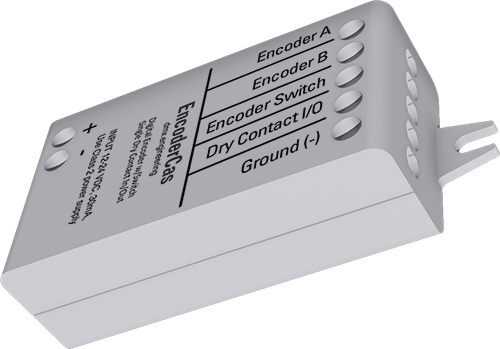
Connect a conventional passive quadrature encoder, its center push switch and one auxiliary dry-contact point. EncoderCas turns physical rotation into proportional Casambi level, push into intelligent on/off memory, and the extra terminal into either a mapped input or a low-current electronic contact.
 MADE IN USADesigned, built and supported in Mesa, Arizona
A physical control surface with network-level intelligence behind it.
A SMALL INTERFACE FOR SERIOUS CONTROL HARDWARE
EncoderCas expects passive A/B phase contacts, a passive center switch and a common Ground. Select the encoder type that matches its edges per detent.
Bourns PEC11R, PEC12R and PEC16, Alps EC12, and CTS 288-class devices are representative matches for this setting.
Use this decoding mode for encoder classes such as the Alps EC11 15-PPR / 30-detent arrangement.
Match a half-step contact sequence without making the physical control feel too fast or skip positions.
Count every quadrature edge for smooth controls, optical encoders and custom OEM user-interface mechanisms.
INTERACTIVE ENCODER FEEL LAB
Change encoder decoding, detents, acceleration, limits and push-button memory. Then rotate or press the simulated control to see what the Casambi Element receives.
This demonstration illustrates the released parameter behavior; it does not configure hardware.
TURN IT Drag, scroll or use ← →
PUSH IT Click the center
Ready. Clockwise raises the level; center push toggles OFF/ON with last-level memory.
THE KNOB FEELS SIMPLE · THE PARAMETERS DO THE WORK
Use the settings to make a compact 24-detent knob, a long-travel precision control or a fast-spinning optical encoder all reach the same Casambi level range naturally.
Set 4–1000 detents from Minimum to Maximum. A nonzero minimum keeps downward rotation from switching fully off; the center button still commands OFF.
Clockwise-up is the default, but direction can reverse. Acceleration levels 1–4 multiply steps during fast turns without crossing the limits.
The center switch can return to Maximum, restore the last nonzero level or use a defined Fixed On Level.
ONE AUXILIARY TERMINAL · TWO POSSIBLE ROLES
The released fixture profile determines whether X2-4 appears as a PushButton input or a low-current output channel. Both roles share X2-5 Ground.
Ready · passive contact open
Signal interface only: the 25 mA published installation rating is for a compatible contact-sense input. Never drive a relay coil, lamp, motor, solenoid or other load.
Match a maintained auxiliary switch or a momentary designer button.
Add dimming and endpoint gestures without another rotary control.
Share absolute level and dim direction with compatible powered NED stations.
Close or release a compatible low-current input from a Casambi command.
TWO GANG-CAPABLE CONTROL SOURCES
Encoder Action has its own Gang setting, and Dry Input Action has another. Matching compatible NED controls exchange absolute level and direction so every station responds correctly on the first operation.
TWELVE VENDOR PARAMETERS
The numeric order is part of the firmware interface and must match the released fixture definition.
Standalone or MultiSwitch Gang 1–10.
Four, two, one or every quadrature edge per detent.
4–1000 detents from minimum to maximum.
Clockwise-up or counter-clockwise-up.
Off or fast-spin multiplier levels 1–4.
Lower knob limit; 0 permits knob-off.
Upper knob limit.
Maximum, last level or fixed level.
Push-button ON level when fixed memory is selected.
Normal, inverted or Gang 1–10.
Follow, toggle, hold or double-tap.
Normal or inverted electronic contact.
FIVE DRY-CONTACT SIGNAL TERMINALS
Power EncoderCas from the specified Class 2 supply and connect only passive encoder/switch contacts to X2. Do not apply external voltage to any X2 terminal.
EncoderCas is not a DMX output, 0–10 V output, relay driver, motor controller or power source. Keep the radio end clear of grounded metal.
DESIGN · WIRE · COMMISSION
Use the installation guide for electrical connections and compatible contact types, then the commissioning guide for all twelve parameters, Gang behavior and acceptance testing.
User Guide v1.00
Encoder terminals, electrical limits, Digital I/O and wiring.Engineering review copy
Encoder types, range, acceleration, memory, Gangs and tests.Bring us the encoder datasheet, detent count, switch functions, desired level behavior and plate concept.