Small DC motors
Command forward, stop and reverse while limiting duty for the required speed or mechanical range.

CASAMBI ENABLED · TWO-WIRE DC POWER CONTROL
casPower puts a programmable H-bridge between Casambi and a two-wire 12–24 VDC load. Drive relays, solenoids, small motors, reversible actuators and other compatible devices—then use two universal digital I/O terminals to connect the rest of the control story.
 MADE IN USADesigned, built and supported in Mesa, Arizona
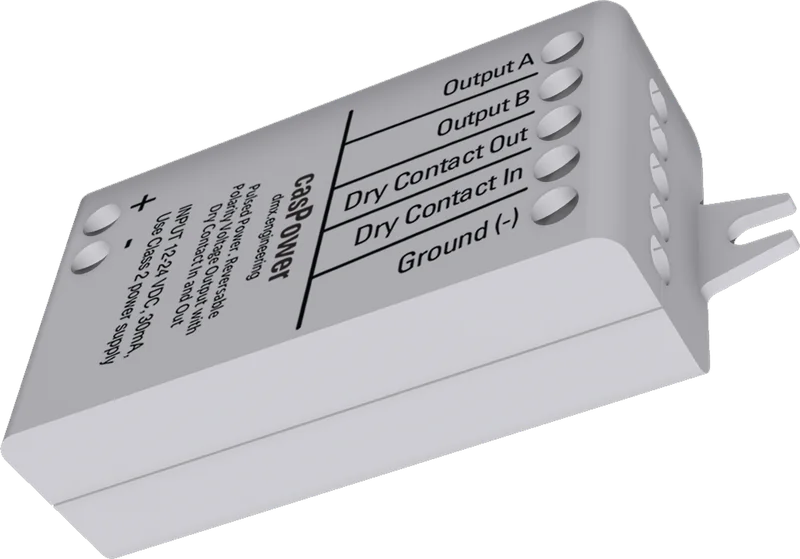
The same two output wires can carry forward polarity, reverse polarity, pulses or high-frequency PWM.
ONE POWER STAGE · MANY TWO-WIRE JOBS
The H-bridge changes both voltage polarity and delivered duty. That makes casPower useful anywhere a compatible two-wire DC device needs more than a simple on/off contact.
Command forward, stop and reverse while limiting duty for the required speed or mechanical range.
Drive shades, vents, dampers, louvers and compatible two-wire mechanisms in either direction.
Apply full power for reliable pull-in, then reduce steady duty when the load manufacturer permits it.
Use maintained power or a precisely timed one-shot pulse for compatible conventional or latching devices.
FOUR OUTPUT PERSONALITIES
Choose the transfer function that matches the electrical load and mechanical application. Verify current, temperature and motion at worst-case supply voltage.
Zero is off; a nonzero command holds the selected polarity. Optional full-duty pull-in can transition to reduced Hold PWM.
A nonzero command produces one full-duty pulse for the programmed duration, then both outputs coast.
Network values below center drive reverse, center is off, and values above center drive forward. Distance from center sets duty.
A unipolar output rises from off to the Max Duty ceiling in the selected base polarity at approximately 20 kHz.
INTERACTIVE H-BRIDGE LAB
Explore the four control modes and watch Output A / Output B respond. This browser demonstration illustrates command behavior; it does not configure hardware.
Begin mechanically safe and uncoupled whenever motion is possible.
Off: Output A and Output B are high impedance; the load coasts.
TWO UNIVERSAL FIELD INTERFACES
Firmware supports either terminal as a voltage-free input or a low-side output. The selected Casambi profile determines which roles and channels are exposed to the installer.
Ready · voltage-free contact open
Ready · voltage-free contact open
Profile availability: the released casPower - 1Out profile exposes one dry output. Firmware supports both terminals and all input definitions shown here; input and simultaneous two-I/O operation require approved Casambi profiles before field use.
MULTISWITCH GANG 1–10
Each input has its own Action and Mode. Assign matching Gang numbers across compatible NED devices to distribute absolute level and next dim direction without traveler wires.
FOURTEEN CONTROL PARAMETERS
The output block controls motion, pulse and duty behavior. I/O 1 and I/O 2 each receive their own three-parameter action, mode and polarity set.
Maintained, Momentary, Reversing or PWM Dim
Forward or reverse base direction
Momentary output on-time in milliseconds
Optional full-duty start period; zero disables it
Reduced steady drive after pull-in when the load permits
1–100% ceiling for PWM Dim and Reversing
Off, On or Last after power-up/restore
Normal or inverted on/off semantics
Standalone/Gang, switch interpretation and electronic-output state
Independent matching parameter set for the second terminal
Start with Max Duty at 100%, Pull-In Time at 0 and Hold PWM at full unless the connected load’s datasheet explicitly supports reduced-duty holding. Measure current and temperature at worst-case voltage.
ONE FLOATING LOAD PATH · TWO DRY INTERFACES
Use a polarity-correct 12–24 VDC Class 2 supply rated for the connected load without exceeding the 2 A application limit.
Do not connect casPower to a constant-current LED-driver output, ground Output A or Output B, or apply external voltage to either Digital I/O terminal.
PLAN · INSTALL · COMMISSION
Use the installation guide for ratings and terminals, then the commissioning guide for all four output modes, parameters, I/O definitions and acceptance testing.
User Guide v1.05
Ratings, connection diagram, H-bridge output and universal I/O.Document version 1.00
Four power modes, fourteen parameters, profiles, Gangs and testing.Bring us the voltage, current, motion or pulse requirement, duty cycle and control sequence.