
Keep the selected metal, glass, stone or custom-engraved control surface.
CASAMBI ENABLED · DESIGNER CONTROL INTERFACE
casIO4
Keep the switch plate.
Change what
it can do.
Put premium architectural buttons, toggles and low-voltage contacts onto the Casambi network. Behind the plate, four configurable channels turn designer controls into scenes, dimming, groups and equipment commands.
DESIGNER SWITCH PLATE ↔ casIO4 ↔ CASAMBI
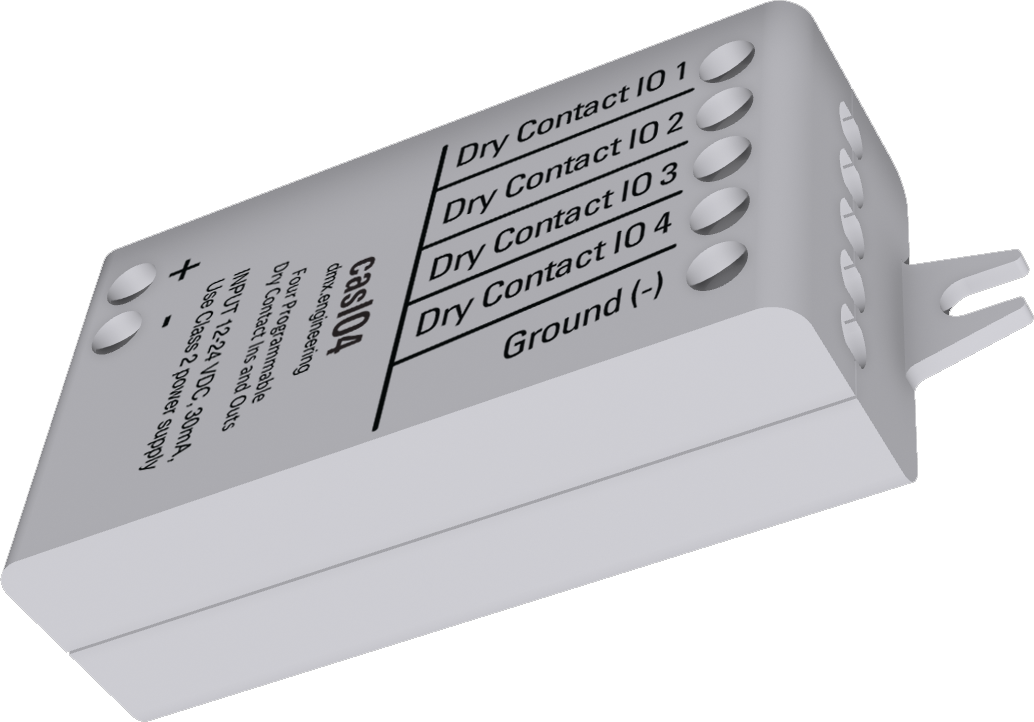
Hide the interface. Keep the experience.
4 channelsconfigurable input / output
5 profilesfrom 4 In through 4 Out
16 parametersfour settings per channel
THE PLATE IS THE EXPERIENCE
Casambi-enable the controls
your designer already chose.
casIO4 sits behind the architectural finish. It reads passive contact closures from premium keypads and switches, then lets Casambi decide what each gesture means.
DESIGNER SWITCH PLATE
Dry-contact buttons preserve the material, engraving and tactile feel specified for the room.
4 WIRES + COMMON→
HIDDEN INTERFACEcasIO4
casIO4
Debounces each contact, applies the selected vendor parameters and reports the command to Casambi.
BLUETOOTH MESH→
CASAMBI NETWORK
CASAMBI
Press a plate button
Assign each input to a light, group, scene or other Casambi target.
Change a button from toggle to scene, hold-to-dim or double-tap without replacing the plate.
Use outputs to signal compatible shades, AV or building equipment that accepts a low-current contact closure.
Turn a momentary contact into the most common Casambi commands.
Use the same premium button for smooth, familiar dimming control.
Add a second action without adding another visible button.
Bring toggles, occupancy contacts and equipment status into Casambi.
ONE DEVICE. FIVE WAYS TO USE IT.
Choose your combination.
Select the fixture profile in Casambi to expose the channels your installation needs. Outputs occupy the first channel positions.
Inputs appear as switch controls; outputs appear as fixture controls. Assign each input to its target in Casambi.
Illustrative profile preview. This selector does not configure a device.
16 VENDOR PARAMETERS · FOUR PER CHANNEL
Program the behavior,
not just the pin.
Pick a channel, then explore the exact settings exposed in Casambi. The selected fixture profile decides whether the physical pin is presented as an input or output; the vendor parameters define how it behaves.
CHANNEL BEHAVIOR PREVIEWStandalone · normal contact · Follow the maintained contact ·
Casambi ON closes the contact · 1 second full-range
sweep
These controls illustrate the available vendor parameters. Configure and read back the actual values in the Casambi app.
0–11Input Action values
normal, inverted or Gang 1–10
normal, inverted or Gang 1–10
0–7Input Mode values
follow, toggle, hold or double-tap
follow, toggle, hold or double-tap
0–2Output Mode values
normal, inverted or 500 ms pulse
normal, inverted or 500 ms pulse
0–9Speed values
1–30 second full-range sweep
1–30 second full-range sweep
FEEL THE DIFFERENCE
Press. Hold. Release.
Try timed dimming and the output pulse in your browser. This is an illustrative simulation, not a connection to hardware.
Use mouse or touch, or hold Space / Enter with the button focused.
Ready · next hold dims up
Release to stop. In Mode 4, the next press reverses direction. At an endpoint, holding does not reverse it.
OUTPUT MODE 2
A precise 500 ms closure.
Switch the Casambi command ON. The contact closes for half a second, then opens—even if the command stays ON.
Contact open
Switch OFF, then ON to trigger another pulse. Dimming speed and input polarity do not change the pulse.
FROM A SINGLE BUTTON TO A WHOLE ROOM
Make every contact useful.
Keep the switches you need.
Use maintained contacts or momentary buttons. Choose contact-following, toggle, fixed-direction hold dimming, alternating hold dimming, or double-tap commands.
Signal compatible equipment.
Choose closed-when-ON, open-when-ON, or a 500 ms closure. Each output is a low-current sink to common ground, rated up to 25 mA—not a load-power output.
Pick up where you left off.
Gang 1–10 lets compatible stations share their final level and direction. Match the gang, input mode, speed and assigned target across participating units.
MULTISWITCH · GANG 1–10
One room.
Several entrances.
One shared state.
When several premium wall stations control the same Casambi target, gang mode lets the next station continue from the level and dimming direction established by the last station used.
WHY A GANG IS NEEDED
Walk across the room. Pick up exactly where you left off.
Without shared switch memory, a second wall station can begin from its own stale state. Put both inputs in the same MultiSwitch gang and casIO4 shares the released level and the next dimming direction.
- Choose the same Gang 1–10 value at every participating station.
- Match input mode, dimming speed and assigned Casambi target.
- The gang is switch memory—not a Casambi luminaire group or scene.
ENTRANCE A
Station A
Hold UP → release at 62%
SHARED SWITCH MEMORY
GANG 3
62%LAST LEVEL
↓NEXT DIRECTION
ENTRANCE B
Station B
Next hold starts at 62% and dims DOWN
Linked: both stations operate like two locations of one intelligent dimmer.
SIMPLE CONNECTIONS. CLEAR LIMITS.
Contacts in.
Contact closures out.
Power the controller with a 12–24 VDC Class 2 supply. Use the four I/O terminals with their shared Ground (−).
Terminal reference
POWER+12–24 VDCSupply return (−)
FIELD CONNECTIONSI/O 1 · Channel 1I/O 2 · Channel 2I/O 3 · Channel 3I/O 4 · Channel 4Ground (−) · common
Input: an unpowered switch between a channel and Ground (−).
Output:
a compatible equipment contact-sense input between a channel and
common.
Dry contacts only. Never apply an external power source to an I/O terminal. Outputs do not power lamps, motors, solenoids or relay coils.
At a glance
- Supply
- 12–24 VDC, Class 2
- Input current
- Less than 30 mA
- Channels
- 4, sharing one ground
- Output capability
- 25 mA maximum sink per channel
- Installation
- Indoor; avoid metal enclosures
- Hold speeds
- 10 settings · 1–30 s full range
- Output pulse
- 500 ms, fixed
Use the commissioning guide for wiring, profile selection and acceptance tests. Visible lighting response also depends on the network and luminaire fade settings.
PLAN. INSTALL. COMMISSION.
The documents, together.
Download the product literature and current commissioning guide for your project.
Commissioning Guide
Revision 1.04 · firmware 1.3.16
Profiles, all 16 vendor parameters, hold speeds, 500 ms pulse and installation tests.Product Brochure
USA & Canada · supplied draft 1.05
Two-page product overview. Use Guide 1.04 for current input-mode and speed behavior.Does casIO4 supply power to connected equipment?
No. It senses dry contacts and provides low-current closures to ground. It does not supply load power or directly drive a relay coil.
How do the ten dimming speeds work?
Modes 2, 3 and 4 use the selected full-range sweep time: 0 Fastest = 1 s; 1 Very Fast = 4 s; 2 Fast = 5 s; 3 Normal = 7 s; 4 Medium = 10 s; 5 Relaxed = 13 s; 6 Slow = 17 s; 7 Very Slow = 21 s; 8 Extra Slow = 25 s; 9 Slowest = 30 s. Release stops the commanded ramp. Partial sweeps take proportionally less time.
What happens on a double tap?
Modes 5, 6 and 7 send full ON, OFF, or toggle ON/OFF on the second tap. These commands use Casambi’s transition behavior, not the Press/Hold Speed setting.
Can several wall stations stay in step?
Yes. Configure compatible units on the same network with matching gang, input mode, speed and target. Final state is shared after the gesture finishes. Test alternating operation at every station during commissioning.
Bring your contacts into Casambi.
Talk to us about the right profile for your installation.