Pulse polarity A
A Casambi ON transition drives Relay A positive relative to Relay B for the configured duration.
A +− B
The latching mechanism moves to the commissioned ON
state.

CASAMBI ENABLED · PANEL RELAY CONTROL
Douglas-style electrical-panel relays switch branch circuits with a short DC pulse—one polarity to set the relay and the opposite polarity to reset it. casDouglas generates those pulses directly and adds programmable low-voltage input and output points.
 MADE IN USADesigned, built and supported in Mesa, Arizona
A short reversing pulse changes the relay state. Then coil power returns to zero.
THE RELAY REMEMBERS · THE COIL DOES NOT STAY POWERED
The H-bridge is the practical way to put either polarity across the same two relay-coil wires. casDouglas applies the selected pulse, verifies the command path, then disables the bridge.
A Casambi ON transition drives Relay A positive relative to Relay B for the configured duration.
An OFF transition drives the same two wires with opposite polarity. Output Polarity can swap which direction represents ON.
The output returns to high impedance. The mechanical relay remains in its last state without continuous coil power.
INTERACTIVE PANEL-RELAY DEMO
Choose the pulse duration, command the relay, and see Relay A/Relay B reverse. This browser demonstration illustrates behavior; it does not configure hardware.
Start with the shortest pulse that reliably transfers the approved relay at worst-case voltage and temperature.
Ready. The H-bridge is disabled and the relay retains its last mechanical state.
A FAMILIAR PANEL · A NEW CONTROL PATH
Use the existing two-lead, polarity-controlled latching relay as the boundary between Class 2 control and the branch circuit it already switches.
The approved Douglas-style relay continues to perform the branch-circuit switching job inside the electrical panel.
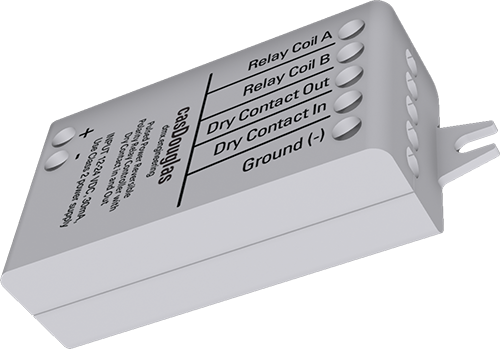
casDouglas connects to the relay’s two-wire coil circuit and translates network state changes into timed polarity pulses.
Name the device for the panel, room, or controlled circuit so commissioning and service records match the electrical schedule.
Measure opposite polarity during ON and OFF, verify zero volts afterward, and confirm the intended circuit state.
THE RELAY IS ONLY PART OF THE JOB
The input brings a voltage-free field contact into Casambi. The output is a ground-referenced solid-state sink for a compatible low-energy contact-sense input.
Ready · external voltage-free contact open
Low-energy interface only: this is not an isolated relay contact. Use only with the released project voltage/current rating and a compatible Class 2 contact-sense input.
Closure and opening report ON/OFF, with optional action inversion.
Each debounced closing edge changes the stored state once.
Choose fixed or alternating dim direction and endpoint behavior.
Keep compatible NED stations aligned on level and next dim direction.
MULTISWITCH GANG 1–10
Give the casDouglas dry input and compatible NED inputs the same Gang number. Level and dim-direction memory move across the Casambi mesh, eliminating the first press that otherwise only catches up stale local state.
FIVE VENDOR PARAMETERS
Commission pulse direction and duration first, then set the local input behavior and dry-output polarity.
Swaps which pulse direction represents relay ON and OFF
Coil pulse length: 250–3000 ms supported by product documentation
Normal, inverted or MultiSwitch Gang 1–10
Static, pulsed, hold-dim or double-tap behavior
Normal or inverted electronic-contact state
After editing parameters, leave the node powered until Casambi completes the parameter write. Then verify values through a controlled power cycle.
CLASS 2 CONTROL AROUND A PANEL RELAY
Power casDouglas from a polarity-correct 12–24 VDC Class 2 supply sized for the controller plus the relay’s measured pull-in current.
Do not connect either relay-coil lead to ground, use a center-tapped coil without an approved interface, or add a single flyback diode across a polarity-reversing coil.
PLAN · INSTALL · COMMISSION
Use the installation guide for ratings and terminal connections, then the commissioning guide for pulse proof, parameters, I/O and acceptance testing.
User Guide v1.04
Ratings, connection diagram, relay output and dry-contact wiring.Engineering review copy
Profiles, pulse verification, five parameters, MultiSwitch and testing.Bring us the relay model, coil voltage/current, panel schedule and control sequence.